3.7 Statistical transformations
The algorithm used to calculate new values for a graph is called a stat, short for statistical transformation.
Let’s take a look at a bar chart. Consider a basic bar chart, as drawn with geom_bar()
ggplot(data = diamonds) +
  geom_bar(mapping = aes(x = cut))
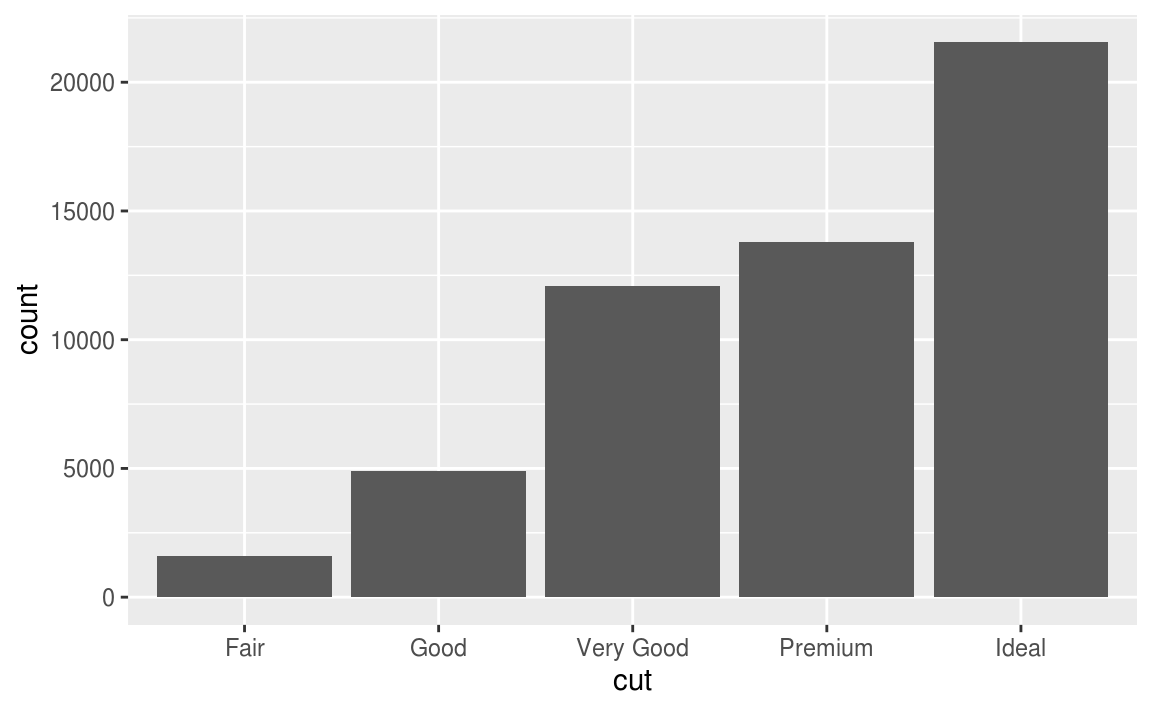
留意上圖中的 y 軸,為cut之下每種不同level的累計數(bin),y 軸對應的並非是自變數!
因此bar charts, histograms, and frequency polygons這類的繪圖,會經過下列的過程(algorithm),y軸對應的是特定的統計量。
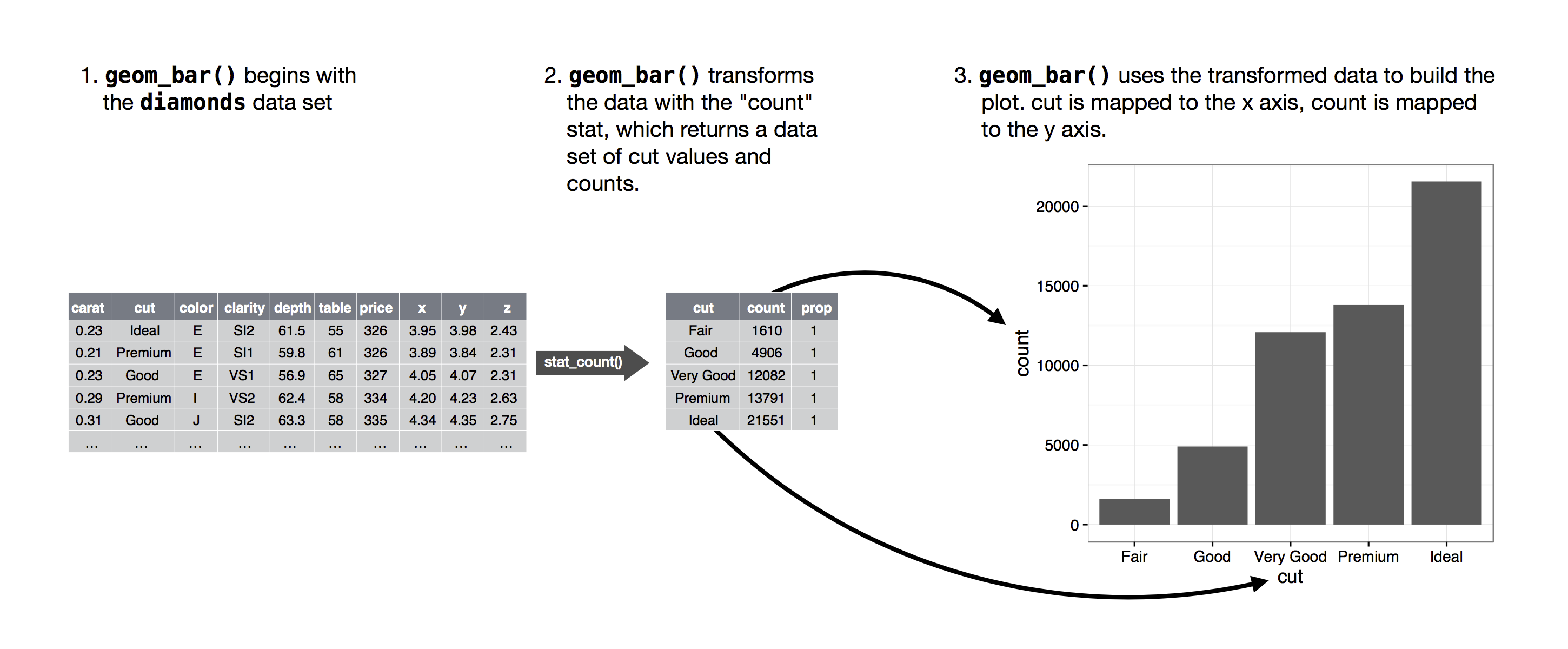
geom_bar()
ggplot(data = diamonds) +
  stat_count(mapping = aes(x = cut))

#ggplot(data = diamonds) +
#  geom_bar(mapping = aes(x = cut))
以上程式區塊內的兩種寫法output的結果相同,因為每個geom 函數有內建的stat 函數,每個stat 函數也有預設的geom 函數,只有下列的情況需要特別指定繪圖的statistical transformation:
- want to override the default
stat
demo <- tribble(
  ~cut,         ~freq,
  "Fair",       1610,
  "Good",       4906,
  "Very Good",  12082,
  "Premium",    13791,
  "Ideal",      21551
)

ggplot(data = demo) +
  geom_bar(mapping = aes(x = cut, y = freq), stat = "identity")
#This lets me map the height of the bars to the raw values
#of a y variable.
- want to override the default mapping from transformed variables to aesthetics
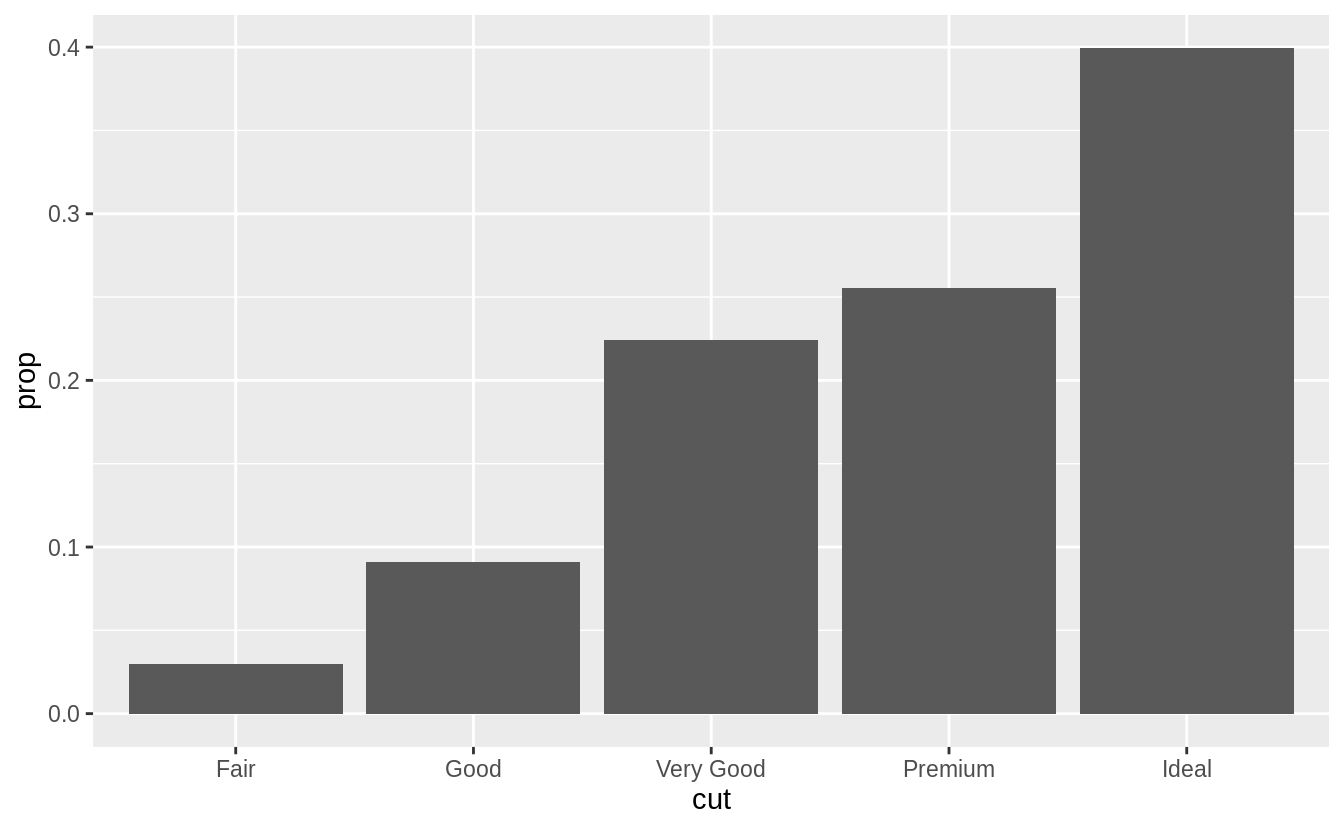
# display a bar chart of proportion, rather than count
ggplot(data = diamonds) +
  geom_bar(mapping = aes(x = cut, y = ..prop.., group = 1))

To find the variables computed by the stat, look for the help section titled “computed variables”.
- draw greater attention to the statistical transformation in your code
#stat_summary(), which summarises the y values for each unique x value

ggplot(data = diamonds) +
  stat_summary(
    mapping = aes(x = cut, y = depth),
    fun.ymin = min,
    fun.ymax = max,
    fun.y = median
  )

- The following tables lists the pairs of
geoms andstats that are almost always used in concert.
| geom | stat |
|---|---|
geom_bar() | stat_count() |
geom_bin2d() | stat_bin_2d() |
geom_boxplot() | stat_boxplot() |
geom_contour() | stat_contour() |
geom_count() | stat_sum() |
geom_density() | stat_density() |
geom_density_2d() | stat_density_2d() |
geom_hex() | stat_hex() |
geom_freqpoly() | stat_bin() |
geom_histogram() | stat_bin() |
geom_qq_line() | stat_qq_line() |
geom_qq() | stat_qq() |
geom_quantile() | stat_quantile() |
geom_smooth() | stat_smooth() |
geom_violin() | stat_violin() |
geom_sf() | stat_sf() |
- The following tables contain the geoms and stats in ggplot2.
| geom | default stat | shared docs |
|---|---|---|
geom_abline() | ||
geom_hline() | ||
geom_vline() | ||
geom_bar() | stat_count() | x |
geom_col() | ||
geom_bin2d() | stat_bin_2d() | x |
geom_blank() | ||
geom_boxplot() | stat_boxplot() | x |
geom_countour() | stat_countour() | x |
geom_count() | stat_sum() | x |
geom_density() | stat_density() | x |
geom_density_2d() | stat_density_2d() | x |
geom_dotplot() | ||
geom_errorbarh() | ||
geom_hex() | stat_hex() | x |
geom_freqpoly() | stat_bin() | x |
geom_histogram() | stat_bin() | x |
geom_crossbar() | ||
geom_errorbar() | ||
geom_linerange() | ||
geom_pointrange() | ||
geom_map() | ||
geom_point() | ||
geom_map() | ||
geom_path() | ||
geom_line() | ||
geom_step() | ||
geom_point() | ||
geom_polygon() | ||
geom_qq_line() | stat_qq_line() | x |
geom_qq() | stat_qq() | x |
geom_quantile() | stat_quantile() | x |
geom_ribbon() | ||
geom_area() | ||
geom_rug() | ||
geom_smooth() | stat_smooth() | x |
geom_spoke() | ||
geom_label() | ||
geom_text() | ||
geom_raster() | ||
geom_rect() | ||
geom_tile() | ||
geom_violin() | stat_ydensity() | x |
geom_sf() | stat_sf() | x |
| stat | default geom | shared docs |
|---|---|---|
stat_ecdf() | geom_step() | |
stat_ellipse() | geom_path() | |
stat_function() | geom_path() | |
stat_identity() | geom_point() | |
stat_summary_2d() | geom_tile() | |
stat_summary_hex() | geom_hex() | |
stat_summary_bin() | geom_pointrange() | |
stat_summary() | geom_pointrange() | |
stat_unique() | geom_point() | |
stat_count() | geom_bar() | x |
stat_bin_2d() | geom_tile() | x |
stat_boxplot() | geom_boxplot() | x |
stat_countour() | geom_contour() | x |
stat_sum() | geom_point() | x |
stat_density() | geom_area() | x |
stat_density_2d() | geom_density_2d() | x |
stat_bin_hex() | geom_hex() | x |
stat_bin() | geom_bar() | x |
stat_qq_line() | geom_path() | x |
stat_qq() | geom_point() | x |
stat_quantile() | geom_quantile() | x |
stat_smooth() | geom_smooth() | x |
stat_ydensity() | geom_violin() | x |
stat_sf() | geom_rect() | x |
Exercise 3.7.5
In our proportion bar chart, we need to set group = 1 Why? In other words, what is the problem with this graph?
# group = 1 is not included
ggplot(data = diamonds) +
  geom_bar(mapping = aes(x = cut, y = ..prop..))
#The proportions are calculated within the groups,
#all the bars in the plot will have the same height, a height of 1
ggplot(data = diamonds) +
  geom_bar(mapping = aes(x = cut, y = ..prop.., group = 1))
- With the
fillaesthetic
# Wrong Answer
ggplot(data = diamonds) +
  geom_bar(mapping = aes(x = cut, fill = color, y = ..prop..))

# With the fill aesthetic, the heights of the bars need to be normalized.
ggplot(data = diamonds) +
  geom_bar(aes(x = cut, y = ..count.. / sum(..count..), fill = color))




 Megan's Note