第六章講解一些RStudio的快捷鍵、使用R語言和他人協作時的慣例(共享的code開頭要寫明使用哪些package,但盡量避免 install.packages() or setwd() 等會變更個人化設定的指令)、 RStudio 錯誤回報時如何診斷問題來源。
看到以下畫面表示有 Syntax error ,游標移動過去就可以看到error message
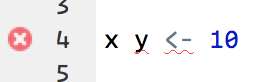
這裡是RStudio官方針對Code Diagnostics的頁面。
第八章講解使用RStudio實作專案時,工作區的設定、資料夾和路徑的管理。
R has a powerful notion of the working directory. This is where R looks for files that you ask it to load, and where it will put any files that you ask it to save.
# running getwd() to print current working directory
getwd()
8.3 Paths and directories
Paths and directories are a little complicated because there are two basic styles of paths:
- Windows uses backslashes to separate the components of the path. (e.g.plots\diamonds.pdf)
- Absolute paths (i.e. paths that point to the same place regardless of your working directory) look different. In Windows they start with a drive letter (e.g.
C:) or two backslashes (e.g.\\servername)
You should never use absolute paths in your scripts, because they hinder sharing: no one else will have exactly the same directory configuration as you. - The last minor difference is the place that
~points to.~is a convenient shortcut to your home directory. Windows doesn’t really have the notion of a home directory, so it instead points to your documents directory.
8.4 RStudio projects
R experts keep all the files associated with a project together — input data, R scripts, analytical results, figures. 在 RStudio 中內建 projects 來實現以上功能。
Click File > New Project, then:
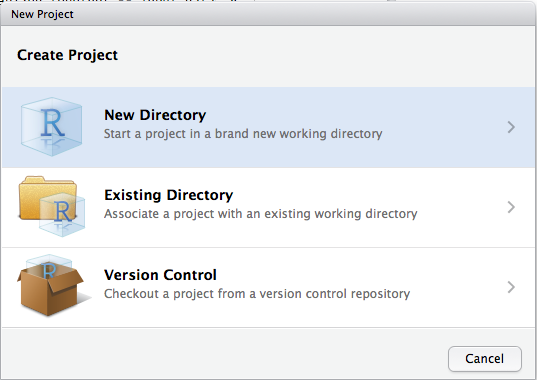
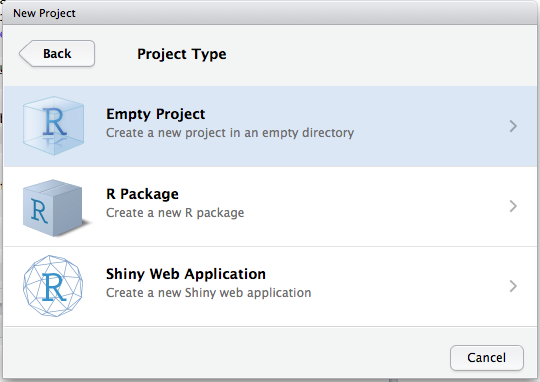
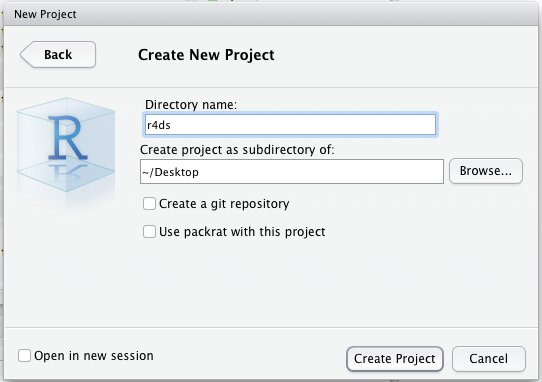
完成以上設定後,輸入 getwd( ) 確認project設定的路徑是否在目前 working directory 之下。
8.5 Summary
R project內建了嚴謹的工作流,確保project之間的隔離與單一project內的工作便利性,其workflow如下:
- Create an RStudio project for each data analysis project.
- Keep data files there; we’ll talk about loading them into R in data import.
- Keep scripts there; edit them, run them in bits or as a whole.
- Save your outputs (plots and cleaned data) there.
- Only ever use relative paths, not absolute paths.
 Megan's Note