據說學習R分成Base R或 tidyverse 兩種package的路徑。
讀了以tidyverse為學習路徑的R for Data Science第一章,(截至目前為止)覺得本書容易閱讀,也是初學者常被推薦R聖經(?)之一,最重要的是網上就有免費電子書(望著爆炸的書架,現在買書都要確認會反覆翻閱才購買實體書)。
目前打算閱讀並跟著書上的code跑一次,將每個章節內容摘錄成筆記存放在這,方便日後查閱。
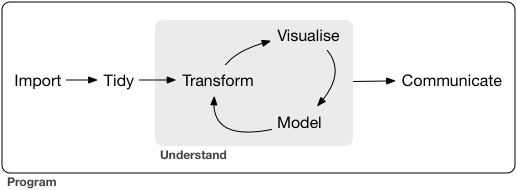
1.1最重要的應該是這張圖,描述資料科學專案的生命週期
補充每個階段的小筆記:
1.Tidy Data意指:滿足每個column為一個變數且每個row是一個觀察值的資料
2.Tidy和Transform同屬Data Wrangling的階段
3.Visualization與Modeling可能迭代多次,這兩個步驟都涉及Knowledge generation
4.最重要的是最後Communiate的步驟,將此專案的結果與他人交流。
5.Programming是橫跨個步驟的工具
1.2概述本書的結構,由於wranging階段容易令初學者感到乏味無趣且挫折,為了避免大家從入門到放棄(喂),本書將以tidied data進行transformation and visualization
↑此時我的心中略崩了一下,都說了DS有80%的時間在資料清理,那麼菜鳥如我想必是得找另外的資源閱讀並實作了,感受到了學無止境喵……
1.3為避免讀者對本書有錯誤的期待與浪費時間,列出本書並☆不☆會陳述的內容:
Big data
Python, Julia, and friends
Non-rectangular data
Hypothesis confirmation
1.4開始課前預備,下載R studio及tidyverse包
install.packages("tidyverse")
library(tidyverse) # Once you have installed a package, you can load it with the library() function---
install.packages(c("nycflights13", "gapminder", "Lahman")) # These packages provide data that we’ll use
                                                           # to illustrate key data science ideas.
1.5介紹本書使用的符號及其對應型態
- Functions are in a code font and followed by parentheses, like
sum(), ormean(). - Other R objects (like data or function arguments) are in a code font, without parentheses, like
flightsorx. - If we want to make it clear what package an object comes from, we’ll use the package name followed by two colons, like
dplyr::mutate(), ornycflights13::flights. This is also valid R code.
package name 兩次冒號 函數或物件名稱 →此結構用以強調來自於哪個包
1.6離開新手村後學習R(debug)的建議
(讀到此段落覺得作者大大對於菜鳥們不僅佛心來著還十分貼心啊,感受到了諄諄教誨)
- Google, StackOverflow
- 提出問題時可利用reprex包貼上R code在支援markdown的地方求助,這裡有詳細說明
- 提問時請注意提及: packages, data, and code
-
tidyverse_update()檢視現在的package是否為最新版本 - 使用
dput()在提問中包含使用的data,可以存放並導出數據結構 - 提問前再次檢查變數名稱(大小寫)是否一致、空格的使用
- 提問時善用註解表達問題所在
- 盡可能移除與問題無關的code
- 工商時間:
https://blog.rstudio.org/
https://www.r-bloggers.com/
發露這些tweeter,以及 #rstats 標籤
https://twitter.com/hadleywickham
https://twitter.com/statgarrett
https://twitter.com/rstudiotips
1.7致謝
1.8版權頁
 Megan's Note